How I test and score
I sift through the plethora of language apps, delivering reviews based on deep expertise in language learning and teaching.
My review process starts with an initial walk-through, using the app for at least 15 minutes to capture first impressions and usability.
I then conduct a criteria-based evaluation focusing on key features like spaced repetition, user customization, and the balance between educational content and gamification.
My reviews are thorough, with a scoring system that emphasizes course quality (70%) over user experience (20%) and price (10%).
Importantly, I do not receive payment for these reviews.
Learn more on my review policy and process page.
Summary
Course quality
User experience
Pricing
Pros
- Visual learning with real-world context
- Very intuitive and clean interface
- Fast object recognition and translation
- Engaging flashcard system
- Fun, low-pressure learning experience
Cons
- Limited free scans available
- No structured learning path
- Weak grammar support
- Occasional recognition inaccuracies
- Limited speaking practice
Best suited for
Visual learners wanting to build Italian vocabulary from real-life objects.
At a glance

App name
CapWords

Made by
HappyPlan Tech
User base
Sentiment
- Fun and engaging way to learn
- Very easy to use
- Beautiful and clean design
- Limited free usage frustrating
- Great for beginners
Concept
Learn Italian by scanning real-world objects with your camera.
Available on
iOS
Levels covered
(A1) Beginner, (A2) Elementary
10 languages taught
Italian, English, Spanish, French, German, Portuguese, Chinese, Japanese, Korean, Russian
Pricing, free trial, refunds
Pricing
Free trial
Refunds
First-hand review
Walk-through
Intro
If you’re learning Italian and you’re curious about more visual, real-world ways to build vocabulary, today I want to talk about an app called CapWords.
CapWords is a mobile app that focuses on learning vocabulary by using your camera. Instead of searching for words or studying lists, I literally point my phone at objects around me, take a photo, and the app turns that object into a word I can learn in Italian.
How CapWords Works
When I open CapWords, the main thing I see is the camera. I can scan pretty much anything around me — objects, food, plants, everyday items — and the app recognizes what I’m looking at.
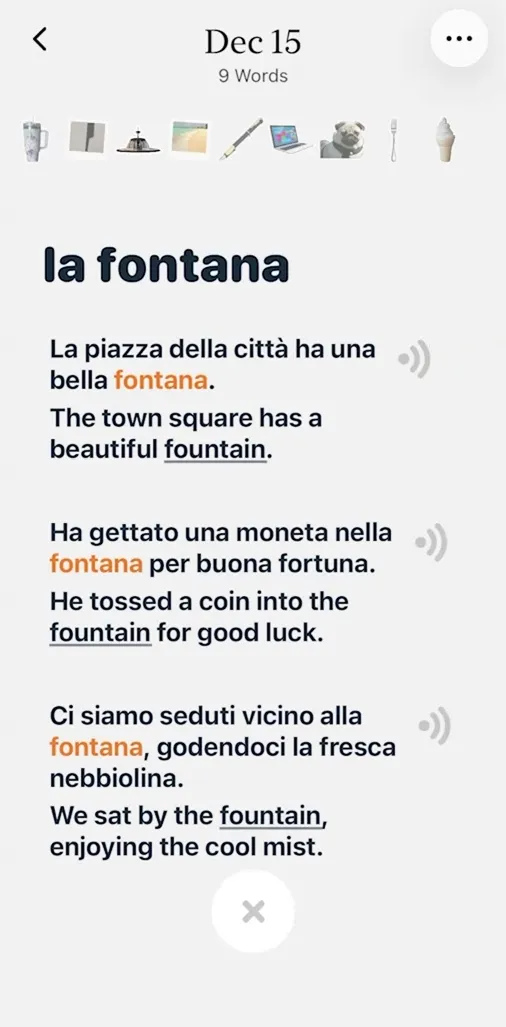
Once I take a photo, CapWords shows me:
- The word in Italian
- The pronunciation
- And example sentences so I can see how the word is actually used
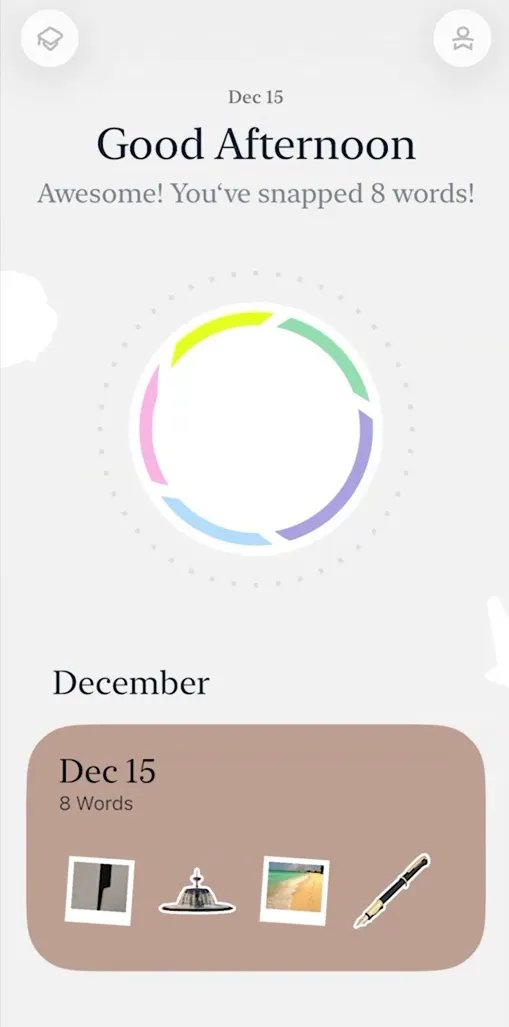
That image then becomes a visual flashcard, which gets saved to my personal word collection. Everything I scan during the same day is grouped together, so over time I end up with a kind of visual diary of the Italian words I’ve learned from real life.
Learning Experience
What I personally like is that learning feels very contextual. I’m not memorizing random vocabulary — I’m learning words connected to things I actually see and touch.
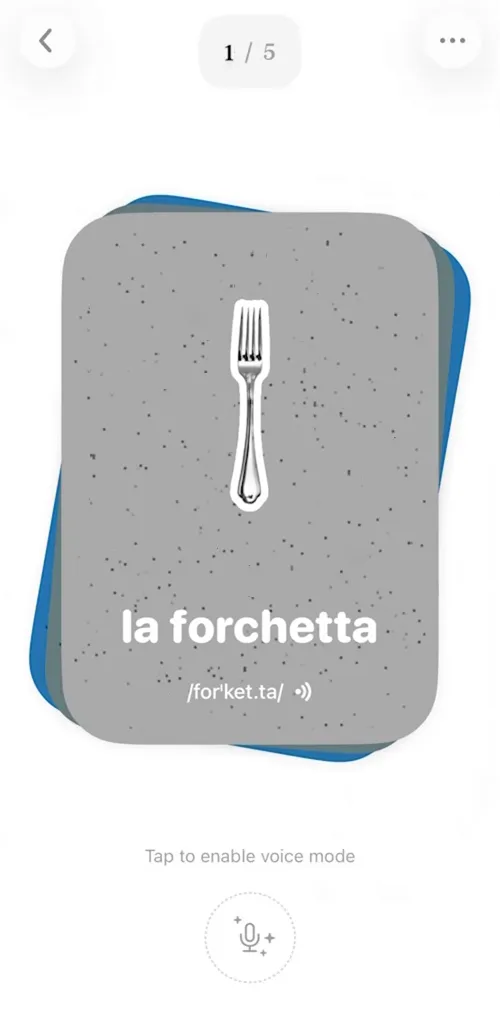
When I review a word later, I see the image on one side and the Italian word on the other. I usually say the word out loud, listen to the pronunciation, and connect it back to the image. It’s very visual and sensory, which makes it easier to remember.
I also noticed that the app encourages a slower, pressure-free pace. There are no levels, no streaks, and no timers pushing me to rush. I can turn reminders on or off, and I just review when it feels natural.

Design & Usability
CapWords is very easy to use. I didn’t need a tutorial — everything feels intuitive. The interface is clean, minimal, and honestly very pleasant to look at.
It’s clear why this app won an Apple Design Award. The experience feels polished, calm, and intentional. Even reviewing flashcards doesn’t feel like studying — it feels more like browsing something I created myself.
Progress is shown in a simple visual way, without heavy charts or complicated stats. I always know roughly how I’m doing without feeling overwhelmed.
Accuracy & Real-Life Use
In my experience, object recognition works well for everyday items. When I tested it with more specific things, like plants, it was surprisingly accurate most of the time.
That said, it’s still AI-based, so occasionally an object might be labeled in a more general way than expected. It’s not perfect, but for vocabulary building, it does the job well.
Subscription & Limits
One thing worth mentioning is that CapWords does have usage limits on the free version. After a certain number of scans, you’ll need to upgrade if you want to keep using the camera freely and review without restrictions.
I won’t go into pricing here, but it’s something to keep in mind if you plan to use it daily.
Who This App Is For
From what I’ve seen, CapWords works best if:
- You’re a visual learner
- You want to build Italian vocabulary naturally
- You like learning from real-life context rather than lessons or grammar explanations
It’s more about word discovery and memory than structured language courses.
Final Thoughts
Overall, CapWords offers a very different way to approach learning Italian vocabulary. It turns everyday moments into learning opportunities and keeps things simple, visual, and low-pressure.
Features
Spaced repetition
Does the app offer plenty of repetition to acquire vocab and grammar naturally?
Customization
Can users customize settings, interface, content, etc.?
Focus on learning
Is the interface and content focused on the course content instead of fluff and gamification?
Personalization
Are the materials automatically tailored to the user’s profile?
Sentence accuracy
Are sentences free from typos, grammar errors? Do they sound natural?
Sentence relevance
Are sentences realistic and useful?
Variety and depth
Is there enough variety of materials in terms of topics, formats and levels?
Audio quality
Are audio materials easy to listen to in terms of recording quality and speech rate?
Speaker's quality
Do speakers speak correctly, clearly and naturally?
Speaking practice
Does the app offer plenty of speaking practice?
Ease of use
Is the app easy to set up, use and navigate?
Interface and design
Is the user interface neat and visually appealing?
Performance
Does the app load fast? Is it free from glitches and crashes?
Grammar notes
Do the courses come with grammar notes?
Learning path
Do the courses follow a well defined path?
Speech recognition
Does the app recognize user speech?
User-generated courses
Can users actively generate materials from their interests?
Offline access
Are the courses available offline?
Conclusions
Would I take these courses?
I would use it to quickly build Italian vocabulary in daily life, but not as my main learning tool since it lacks structure and deeper language training.
How to get the most out of the app
Use it daily to scan real objects and review flashcards consistently, combining it with a structured course to improve grammar and speaking skills.
Alternatives
Think In Italian is better than CapWords to master Italian
Think In Italian is the only app that gets your to speak Italian all the time. It comes with hundreds of grammar lessons and readings to listen and repeat, plus an AI tutor to review the courses and practice conversation. See the full review.
FAQs
What is CapWords used for?
Learning Italian vocabulary using real-world objects.
Does CapWords teach grammar?
No, it mainly focuses on vocabulary.
Is CapWords free?
It has a limited free version.
Can I use it offline?
No, it requires an internet connection.
Is CapWords good for beginners?
Yes, especially for basic vocabulary building.
A better choice: Think In Italian
Create a free lifetime account to get access to all the free courses and other resources.
Rave Reviews
★★★★★
Rated 4.9/5 based on 170+ reviews