If you’re just busy right now and need to take a break, you may pause your subscription and resume it whenever you feel ready.
You will not be charged while your subscription is paused.
Pausing is also better than canceling because the price is locked in. That means that, when you resume your plan, you’ll still pay the same price. Please note that a subscription that has already been canceled cannot be resumed and a new price may apply if you start a new plan.
You may keep your plan on pause as long as you’d like. But keep in mind that you may only pause your subscription once per billing cycle. For example, if you have a monthly plan, that’s once per month.
Here’s how to pause your subscription:
1. On the left side of the screen, click “More“.

2. Select “Manage account“.

3. You will be taken to a new page. From there, click on “My Subscription“.
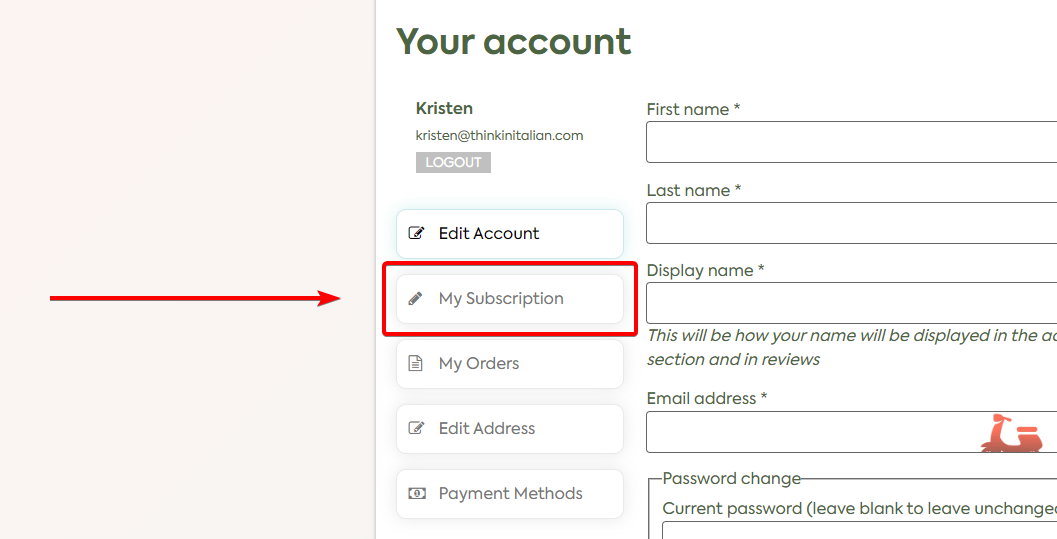
4. Find your current subscription and click on “View“.

5. You should be able to see your subscription details. Just simply click on the “Suspend” button to pause it.
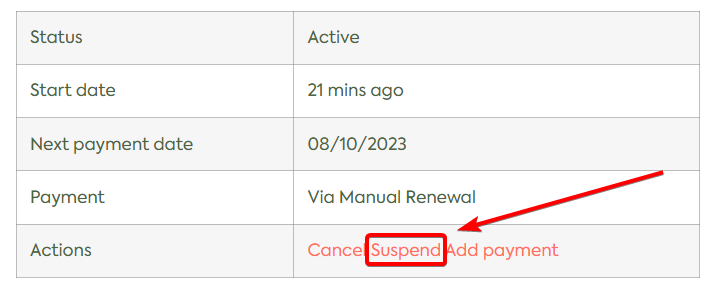
Once paused, you may resume your subscription whenever you’d like.